
Replacing batteries in the remotecontrol and cordless headphones

The remote control and headphones each run on 2 AAA batteries.
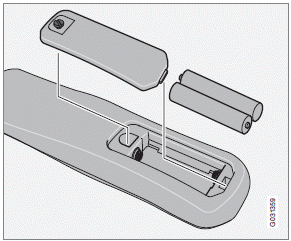
Remote control
1. Remove the retaining screw and lift off the
battery cover.
2. Remove the old batteries and insert new
ones as indicated by the symbols in the
battery compartment.
3. Replace the battery cover and tighten the
retaining screw.
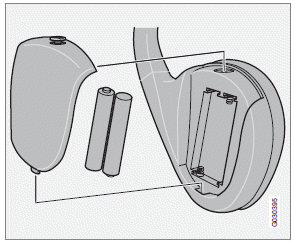
Cordless headphones
1. Remove the retaining screw and lift off the
battery cover.
2. Remove the old batteries and insert new
ones as indicated by the symbols in the
battery compartment.
3. Replace the battery cover and tighten the
retaining screw.
NOTE
If the temperature in the passenger compartment
is high (e.g., if the car has been
parked in the sun for a prolonged period) or
if the batteries in the remote or headphones
are weak, a message will appear on the RSE
screens.
Concern for the environment
Used batteries should be disposed of properly (e.g., at a recycling facility, etc).
See also:
Range
The PCC's lock and unlock functions have a range of approximately 60 ft. (20
m) from the vehicle.
NOTE
The approach lighting, panic alarm, and the functions controlled by the
inform ...
Impact protection
The two front airbags are 'intelligent' and deploy in two stages according to
the severity of the accident, alleviating the risk of facial injuries caused by
the occupants' faces impacting with th ...
Tire sealing system–overview
1 Speed limit sticker
2 On/Off switch
3 Electrical wire
4 Bottle holder (orange cover)
5 Protective hose cover
6 Air release knob
7 Hose
8 Bottle with sealing compound
9 Air pressure gauge
...