
Marker lines

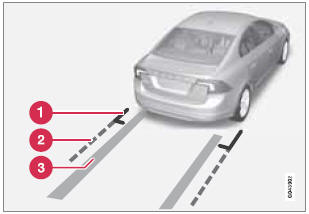
1 - Marker line for a 1-foot (30-centimeter) zone behind the vehicle
2 - Marker
line for the clear back-up zone
3 - "Wheel tracks"
The solid line (1) indicates a zone within 1 ft (30 centimeters) of the rear bumper.
The dashed line (2) indicates the clear zone of approximately 5 feet (1.5 m) behind the bumper. These lines also indicate the outmost limits that any object (door mirrors, corners of the body, etc.) extends out from the vehicle , even when the it turns.
The "wheel tracks" (3) between the side marker lines show where the wheels will roll and can extend up to approximately 10.5 ft (3.2 m) behind the bumper if there are no objects in the way.
See also:
Reduced alarm function
Turning off the accessory alarm sensors
In certain situations it may be desirable to turn
off the accessory inclination and movement
alarm sensors if, for example, you drive your
vehicle onto a ...
Storing a channel
A total of 20 satellite channels can be stored;
10 channels each for Sirius 1 and 2, see page 215 for detailed information on
storing
channels.
• A long press on one of the number keys
stores ...
Cleaning the interior
Only use cleaning agents and car care products recommended by Volvo. Clean regularly
and follow the instructions included with the car care product.
Upholstery care
Fabric
Clean with soapy water ...