
Function

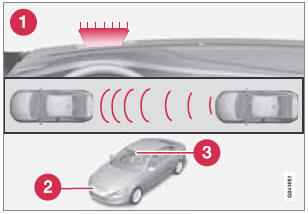
Function overview
1 - Visual warning signal, collision risk
2 - Radar sensor
3 - Camera
See also:
Windshield wipers
1 Thumb wheel
2 Rain sensor on/off
Windshield wipers off
If the lever is in the 0 position
and
you move it upwards, the wipers
will sweep one stroke at a time for
as long as you hold the lev ...
Filling washer fluid
Location of the washer fluid reservoir
The windshield and headlight washers share a
common reservoir.
The washer fluid reservoir is located on the
driver's side of the engine compartment. Duri ...
Limitations
Distance Alert uses the same radar sensor
used by Adaptive Cruise Control and the Collision
Warning system. See page 159 for more
information on the radar sensor’s limitations.
NOTE
Strong sun ...