
Setting a time interval

The set time interval to vehicles ahead can be increased by pressing
 and decreased by pressing
 . The current time interval is shown
briefly in the display following adjustment.
. The current time interval is shown
briefly in the display following adjustment.
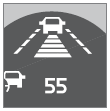 Different time intervals
can be selected and are shown in the display as 1–5 horizontal bars. The greater
the number of bars, the longer the time interval.
Different time intervals
can be selected and are shown in the display as 1–5 horizontal bars. The greater
the number of bars, the longer the time interval.
One bar represents a time interval of approximately 1 second; 5 bars is approximately 2.5 seconds. At low speeds, when the distance to the vehicle ahead is short, ACC increases the time interval slightly. In order to follow the vehicle ahead as smoothly as possible, ACC allows the time interval to vary considerably in certain situations.
 WARNING
- Only use a time interval that is suitable in current traffic conditions.
- A short time interval gives the driver limited reaction time if an unexpected situation occurs in traffic.
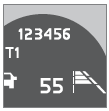 The number of bars indicating
the selected time interval are shown while the setting is being made and for several
seconds afterward. A smaller version of the symbol is then shown to the right in
the display. The same symbol is also displayed when Distance Alert is in active
mode, see page 165 .
The number of bars indicating
the selected time interval are shown while the setting is being made and for several
seconds afterward. A smaller version of the symbol is then shown to the right in
the display. The same symbol is also displayed when Distance Alert is in active
mode, see page 165 .
See also:
Tire sealing system–temporarilyrepairing a flat tire
Temporarily repairing a flat tire is done in two
stages:
• Stage 1: The hole is sealed by pumping
sealing compound into the tire. The car is
then driven a short distance to distribute
the sea ...
Infant seats
Securing an infant seat with a seat belt
Do not place the infant seat in the front passenger's seat
NOTE
Refer to page 49–50 for information on securing a child restraint using ISOFIX/
...
Introduction
1 BLIS camera
2 Indicator light
3 BLIS symbol
The Blind Spot Information System (BLIS) is an
information system that indicates the presence
of another vehicle moving in the same direction
a ...