
Introduction

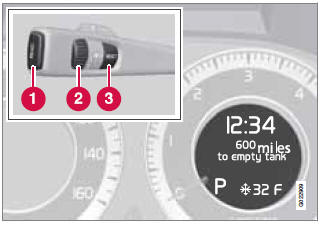
Information display and controls
1 - READ–press to acknowledge/confirm/ erase a message)
2 - Thumb wheel (used to scroll among the trip computer menus)
3 - RESET–resets certain functions
To scroll through trip computer information, move the thumb wheel up or down. Continue turning to return to the starting point.
See also:
Installing the steel cargo grid
For information about the necessary tools and
procedures for installing/removing the steel
cargo grid, please refer to the assembly
instructions that were included when the grid
was purchased. ...
Symbols in the instrument panel
WARNING
If and
come on at the same time and the brake
level is below the MIN mark in the reservoir or if a brake system-related message
is shown in the information display: DO NOT DRIVE ...
Changing engine oil and oil filter
Refer to the Warranty and
Service Records Information booklet for information
on the oil change intervals.
NOTE
Volvo does not recommend the use of oil
additives.
Synthetic oil is not used when ...