
Temperature control

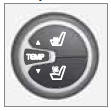 The temperatures on
the driver and passenger sides can be set separately. When the vehicle is started,
the most recent setting is resumed.
The temperatures on
the driver and passenger sides can be set separately. When the vehicle is started,
the most recent setting is resumed.
 NOTE
NOTE
Heating or cooling cannot be speeded up by selecting a higher/lower temperature than the actual temperature required.
See also:
Volvo On Call
Volvo On Call is an advanced telematics system and another valuable personal
security feature. It uses an integrated GSM telephone with a built-in GPS unit
for satellite positioning, and ensures h ...
Premium Sound Multimedia
• 7" color TFT display
• Voice control
• Thumb wheel on the steering wheel keypad
• AM/FM/HD radio
• Sirius satellite radio
• CD/DVD (mp3 and wma file formats)
• AUX and USB sockets
• Blue ...
Installing the ball holder
1. If necessary, remove the cotter pin from
the locking bolt and slide the locking bolt
out of the hitch assembly.
2. Slide the ball holder into the hitch assembly.
3. Align the hole in the ball ...