
Lighting panel

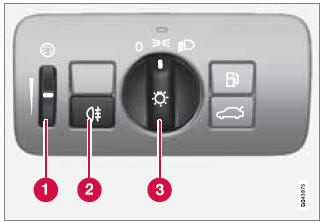
Overview, light switches
1 - Thumb wheel for adjusting display and instrument lighting
2 - Rear fog light
3 - Headlights/parking lights
Instrument lighting
Illumination of the display and instrument lights will vary, depending on ignition mode.
The display lighting is automatically subdued in darkness and the sensitivity is set with the thumb wheel.
The intensity of the instrument lighting is adjusted with the thumb wheel.
See also:
Returning the spare wheel to the storagecompartment
1. Use the crank (turn it counterclockwise) to
lower the spare wheel's retaining cable.
2. Pass the toggle at the end of the cable
through the center hole in the spare wheel.
Pivot the toggle ...
Deactivation
Move the gear selector from R to another position.
There is a slight delay in the PAC system,
which means that the view from behind the
vehicle will remain on the screen for approximately
15 se ...
Front park assist
The distance monitored in front of the vehicle
is approximately 2.5 ft (0.8 m). The audible signal
comes from the audio system's front
speakers.
It may not be possible to combine auxiliary
...