
Trip odometers

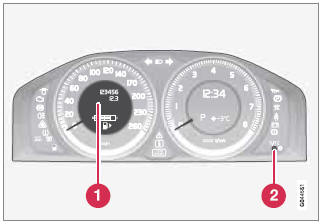
Trip odometers and reset button
1 - Odometer display
2 - Button for toggling between T1 and T2, and for resetting the odometer
The trip odometers are used to measure short distances. A short press the button toggles between the two trip odometers T1 and T2. A long press (more than 2 seconds) resets an active trip odometer to zero. The distance is shown in the display.
See also:
Selecting a station (in wavebands AM/FM1/FM2)
Automatic tuning
1. Press RADIO. Continue pressing this button
to toggle to the desired waveband
(AM, FM1, etc.).
2. Release the button and wait several seconds
or press OK/MENU.
3. Press the ...
Brake fluid reservoir
The brake fluid should always be above the
MIN mark on the side of the reservoir. Check,
without removing the cap, that there is sufficient
fluid in the reservoir.
Fluid type: DOT 4+ boiling poi ...
Quality and equipment
A passion for high quality lies at the heart of the Volvo brand. This is
inherent not only in the build quality that reflects the ruggedness, durability
and reliability for which Volvo is renowned ...