
The laser sensor

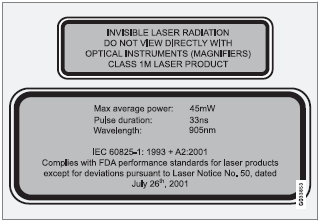
The upper decal describes the laser beam's classification and contains the following text:
Invisible Laser radiation – Do not view directly with optical instruments (magnifiers) – Class 1M laser product.
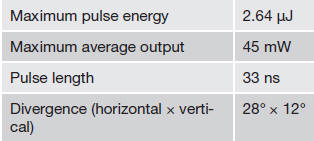
The lower decal describes the laser beam's physical data and contains the text:
IEC 60825-1:1993 + A2:2001. Complies with FDA performance standards for laser products except for deviations pursuant to Laser Notice No. 50, dated July 26th, 2001 The laser beam's physical data is listed in the following table:
NOTE
The function of aftermarket laser detectors
may be affected by City Safety's laser sensor.
WARNING
The laser sensor emits light when the ignition
is in mode II or higher, even if City
Safety™ has been switched off.
WARNING
Eye injury may occur if any of the following
points are not followed:
• It is essential that all pertinent instructions
be followed when handling laser
instruments. Testing, repairing, removing,
adjusting and/or replacing any
components in the laser sensor may
only be done by a trained and qualified
Volvo service technician.
• Do not remove the laser sensor (including
removal of the lenses). A laser sensor
that has been removed belongs to
laser class 3B according to standard
IEC 60825-1. Devices in laser class 3B
present a risk of injury to the eyes.
• The laser sensor’s connector must be
disconnected before the sensor is
removed from the windshield.
• The laser sensor must be mounted in
place on the windshield before connecting
the sensor’s connector.
• Do not view the laser sensor (which
emits spreading, invisible laser beams)
with optical instruments from a distance
of less than 4 inches (100 mm).
See also:
Settings made from the front center control panel
1 MEDIA
2 TUNE
3 OK/MENU
4 EXIT ...
How HD broadcasting works
HD Radio works similarly to conventional radio
and broadcasts of this type are available in
many areas of the United States. However,
there are a few key differences:
• Instead of transmitting ...
Exterior
The midsize XC70 rides a 108.8-inch wheelbase and measures 186.3 inches long
overall. Rounded front corners resemble those of Volvo's S80 sedan, but the rear
half retains the straight lines and pr ...