
Trip odometers

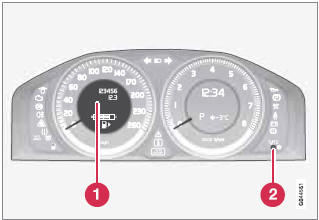
Trip odometers and reset button
1 Odometer display
2 Button for toggling between T1 and T2,
and for resetting the odometer
The trip odometers are used to measure short distances. A short press the button toggles between the two trip odometers T1 and T2. A long press (more than 2 seconds) resets an active trip odometer to zero. The distance is shown in the display.
See also:
Getting Around
The C30 is a fun car to drive. It has a 227-horsepower, turbocharged
five-cylinder engine that makes 236 pounds-feet of torque, which is a lot of
power for such a small car. It's estimated to get ...
The radar sensor and its limitations
In addition to being used by ACC, the radar
sensor is also used by Distance Alert (see
page 164) and Collision Warning with Full
Auto-brake and Pedestrian Detection (see
page 172). This sensor ...
Operation
The seats can be adjusted for a short period
after unlocking the door with the remote control
without the key in the ignition slot. Seat
adjustment is normally made when the ignition
is on and ...