
Indicator, information, and warning symbols

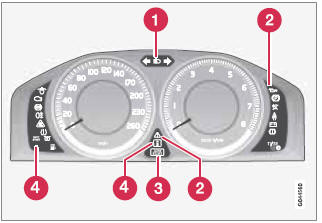
Indicator and warning symbols
1 High beam and turn signal indicators
2 Indicator and warning symbols
3 Information symbols
4 Indicator and warning symbols
See also:
Continued
This symbol
can be found at the lower right
corner of an odd-numbered (right-hand) page
to indicate that the current topic is continued
on the following page. ...
Introduction
All bulb specifications are listed on page 328.
The following bulbs should only be replaced by
a trained and qualified Volvo service technician:
• Dome lighting, reading lights
• Glove compartmen ...
Environment
Volvo is passionately committed to protecting our environment. Along with
safety, environmental protection is a cornerstone of the Volvo brand,
commensurate with the company's philosophy to protect ...