
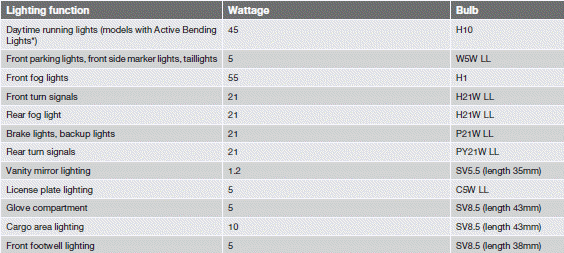
Bulb specifications


NOTE
Please consult a Volvo retailer’s Parts
department for the most up-to-date specifications.
See also:
Heated oxygen sensors
The heated oxygen sensors monitor the oxygen content of the exhaust gases. Readings
are fed into a control module that continuously monitors engine functions and controls
fuel injection. The ratio ...
Ignition mode functions
The various ignition modes are accessed with
the remote key in the ignition slot.
...
Vehicles equipped with Park Assist
Colored fields (4-one per sensor) indicate distance
If the vehicle is equipped with the optional Park
Assist system, the distance to an object will be
indicated more exactly and colored markers ...