
Blind Spot Information System

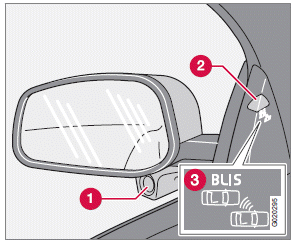
1 BLIS camera
2 Indicator light
3 BLIS symbol
The Blind Spot Information System (BLIS) is an information system that indicates the presence of another vehicle moving in the same direction as your vehicle in the side-view mirror's "blind area." The system is based on digital camera technology.
The cameras (1) are located beneath the side-view mirrors.
When one (or both) of the cameras have detected a vehicle in the blind area (up to approximately 10 ft. (3 meters) from the side of your vehicle, and up to approximately 31 ft.
(9.5 meters) behind the side-view mirror), see the illustration, the indicator light in the door panel (2) illuminates. The light will glow continuously to alert the driver of the vehicle in the blind area.
WARNING
• BLIS is an information system, NOT a
warning or safety system.
• BLIS does not eliminate the need for
you to visually confirm the conditions
around you, and the need for you to turn
your head and shoulders to make sure
that you can safely change lanes.
• As the driver, you have full responsibility
for changing lanes in a safe manner.
NOTE
The door panel indicator light illuminates on
the side of the vehicle where the system has
detected another vehicle. If your vehicle is
passed on both sides at the same time, both
lights will illuminate.
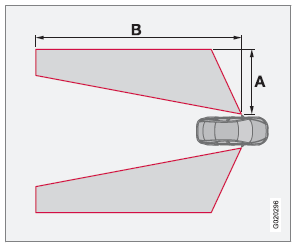
Areas monitored by BLIS
Distance A = approx. 10 ft. (3 meters)
Distance B = approx. 31 ft. (9.5 meters)
BLIS has an integrated function that alerts the driver if a fault should occur with the system.
For example, if one or both of the system's cameras are obscured, a message will appear in the information display in the instrument panel. If this occurs, clean the camera lenses. If necessary, the system can be temporarily switched off (for instructions)
See also:
Emergency Brake Assistance
EBA is designed to provide full brake effect
immediately in the event of sudden, hard braking.
The system is activated by the speed with
which the brake pedal is depressed.
When the EBA system i ...
Uniform Tire Quality Grading
Quality grading information
ALL PASSENGER VEHICLE TIRES MUST
CONFORM TO FEDERAL SAFETY
REQUIREMENTS IN ADDITION TO THESE
GRADES
Quality grades can be found, where applicable,
on the tire sid ...
Warning symbols on the battery
NOTE
A used battery should be disposed of in an
environmentally responsible manner. Consult
your Volvo retailer or take the battery to
a recycling station. ...