
Steering wheel keypad

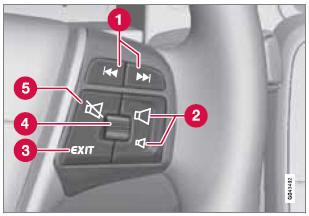
Standard steering wheel keypad
1 - Left/right arrow keys: A short press moves between preset radio stations or tracks on a disc. Press and hold to search within tracks or to tune to the next/previous strong radio station.
2 - Volume
3 - EXIT: Go higher in the menu system, interrupt the current function, reject an incoming phone call or erase any characters entered in the display. Press and hold to go to the highest level in the current menu. From the highest level in the current menu, press and hold to go to the infotainment system's main menu view (see page 208).
4 - Thumb wheel, used to scroll in the menus shown on the display. Press the thumb wheel to e.g., confirm a menu selection or to answer an incoming call on a Bluetoothconnected cell phone.
5 - Mute
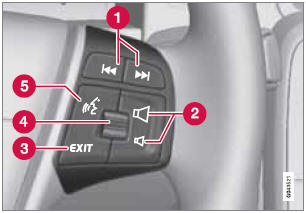
Steering wheel keypad with voice control button
1 - Left/right arrow keys: A short press moves between preset radio stations or tracks on a disc. Press and hold to search within tracks or to tune to the next/previous strong radio station.
2 - Volume
3 - EXIT: Go higher in the menu system, interrupt the current function, reject an incoming phone call or erase any characters entered in the display. A long press takes you to the main menu view (see page 208).
4 - Thumb wheel, used to scroll in the menus shown on the display. Press the thumb wheel to e.g., confirm a menu selection or to answer an incoming call on a Bluetoothconnected cell phone.
5 - Voice control (for operating Bluetooth- connected cell phones and the optional navigation system)
See also:
Getting started
Use the controls in the center console (3) or the
buttons in the steering wheel keypad to
access, navigate and make selections in the
hands-free system’s menus.
Activating/deactivating
A short pr ...
Common functions: Remote key/ Personal Car Communicator (PCC)*
Personal Car Communicator (PCC)*
Lock
Unlock
Approach lighting
Trunk unlock/open
Panic alarm ...
Searching for and storing songs
The Song Seek function provides notification
when Sirius is broadcasting the songs selected
in song memory. Song memory enables you
to store the name of the song for future
advance notificatio ...