
Switching BLIS on and off

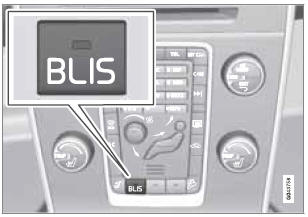
BLIS is automatically activated when the ignition is switched on. The indicator lights will provide confirmation by flashing 3 times.
- The system can be switched off by pressing the BLIS button in the center console (see the illustration). The indicator light in the button goes out when the system is switched off, and a text message is displayed.
- BLIS can be switched on again by pressing the button. The indicator light in the button will illuminate and a new text message will be displayed. Press the READ button (see page 131) to erase the message.
Depending on the vehicle's optional equipment, there may not be space for the BLIS button in the center console. In this case, BLIS can be switched on and off in the menu system by pressing MY CAR and going to Settings Car settings BLIS. See page 134 for a description of the menu system.
See also:
Radio text
Some stations transmit information on program content, artists, etc. This information
can be shown on the display.
Activate/deactivate in FM mode under Show radio text. ...
Sound stage
The sound experience can be optimized for the driver's seat, both front seats
or the rear seat. If the front and rear seats are occupied, the sound stage setting
Front seats is recommended. Se ...
Tire wear
Tire rotation
Your vehicle has no required tire rotation. Tire
wear is affected by a number of factors such
as tire inflation, ambient temperature, driving
style, etc.
NOTE
• If the tires are ro ...