
Symbols and messages in the display

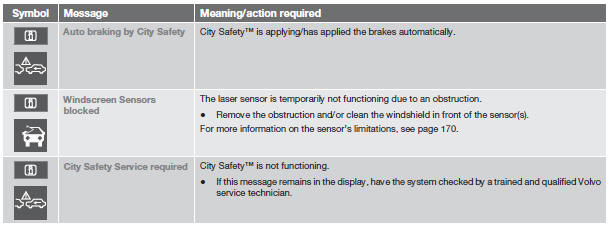
When City Safety™ automatically applies the brakes, one or more of the symbols in the main instrument panel may illuminate and its associated message will be displayed.
A text message can be erased by pressing briefly on the READ button on the turn signal lever.
See also:
Setting a time interval
Controls and display
3 - Time interval: Increase/decrease
6 - Time interval: On, while it is being set
7 - Time interval: On, after it has been set
Press to increase the interval or
to decrea ...
Minor scratches on the surface
If the stone chip has not penetrated down to
the metal and an undamaged layer of paint
remains, the touch-up paint can be applied as
soon as the spot has been cleaned. ...
Weights
A Permissible axle weight or gross vehicle weight must never be exceeded.
B Front Wheel Drive
C All Wheel Drive
CAUTION
The maximum permissible axle loads and/
or the gross vehicle weight mus ...