
Connecting a device to the A/V-AUX socket

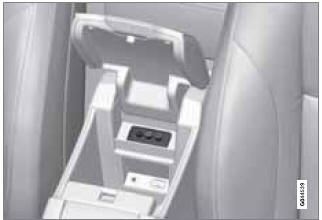
The A/V-AUX socket is located under the center armrest in the tunnel console
1. Connect the device's video cable to the yellow connector.
2. Connect the left audio cable to the white connector and the right audio cable to the red one.
3. If the device is designed to use 12-volt current, connect its power cable to the 12-volt socket (see page 200 for the location of this socket).
Always follow the device's instructions when connecting it to the RSE system.
See also:
Messages
Park brake not fully released – A fault is preventing
the parking brake from being released.
Try to apply the parking brake and release it
several times. If the problem persists, contact an aut ...
Automatic transmission – shift gatepositions
Shift gate positions
Depress the button on the front of the gear
selector knob to move between the R, N, D,
and P positions.
Kickdown
Automatic shift to a lower gear (kickdown) is
achieved by ...
Crash mode
Crash mode ...