
Symbols in the instrument panel

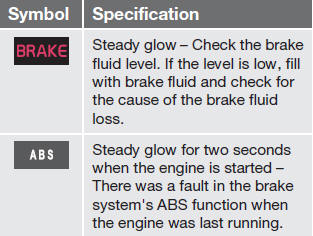
WARNING
If  and
and  come on at the same time
and the brake level is below the MIN mark
in the reservoir or if a brake system-related
message is shown in the information display: DO NOT DRIVE. Have the vehicle
towed to a trained and qualified Volvo service
technician and have the brake system
inspected.
come on at the same time
and the brake level is below the MIN mark
in the reservoir or if a brake system-related
message is shown in the information display: DO NOT DRIVE. Have the vehicle
towed to a trained and qualified Volvo service
technician and have the brake system
inspected.
See also:
Oil pressure warning light
If the light comes on while
driving,
stop the vehicle and then
stop the engine immediately and
check the engine oil level. If the light stays on after
restart, have the vehicle towed to the nea ...
Comfort
Comfort mode offers a somewhat softer ride
and the transmission shifts gears at lower rpm.
This mode is particularly suitable for long-distance
highway driving. The indicator light in the
butto ...
Cold weather precautions
If you wish to check your vehicle before the
approach of cold weather, the following advice
is worth noting:
• Make sure that the engine coolant contains
50 percent antifreeze. Any other mixture
...