
Selecting a magnetic zone

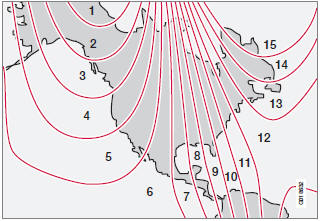
Magnetic zones.
The earth is divided into 15 magnetic zones.
The correct zone must be selected for the compass to work correctly.
1. Put the ignition in mode II.
2. Using a pen or similar object, press and hold the button on the rear side of mirror for at least 3 seconds. The number for the current area will be shown.
3. Press the button repeatedly until the number for the required geographic area (1 – 15) is shown.
4. The display will revert to showing the compass direction after several seconds.
See also:
C70 in the Market
The C70 is a good luxury convertible, but it's in a class where good might
not be enough. Competitors — notably the Mercedes-Benz E-Class — do a better job
of protecting those in the car from buff ...
Front fog lights
NOTE
Avoid touching the glass on the bulb with
your fingers.
1. Switch off the ignition.
2. Turn the bulb holder slightly counterclockwise
to release it.
3. Replace the bulb. The shape of the ...
Power moonroof*
Introduction
The moonroof controls are located in the ceiling console near the rearview mirror.
The moonroof can be opened vertically and horizontally. The vehicle's ignition must
be in mode ...