

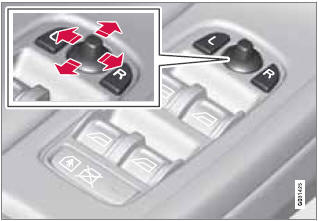
Power door mirrors

Power door mirrors  - Mirrors - Your driving environment - Volvo XC60 Owners Manual - Volvo XC60

Door mirror controls

See also:

Navigating in the menus
Infotainment settings are made via the system's menus. Press one of the mode buttons (RADIO, MEDIA, or TEL—see the illustration on page 206) to select it and access its specific menus. When a ...

Advanced
In this mode, body sway in curves is minimal and steering response is very direct. Gear shifting is done at high rpm in each gear for dynamic and active driving. ...

Selecting a station (in wavebands AM/FM1/FM2)
Automatic tuning 1. Press RADIO. Continue pressing this button to toggle to the desired waveband (AM, FM1, etc.). 2. Release the button and wait several seconds or press OK/MENU. 3. Press the ...