
Removing the key blade

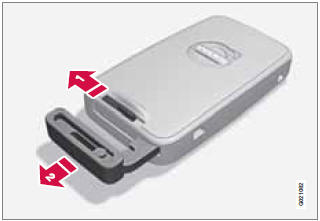
Removing the key blade
1 Slide the spring loaded catch to the side.
2 Pull the key blade straight out of the remote key.
See also:
Changing
WARNING
Connect and disconnect the positive and
negative cables in the correct sequence. ...
Introduction
The Dynamic Stability and Traction Control
system (DSTC) consists of a number of functions
designed help reduce wheel spin, counteract
skidding, and to generally help improve
directional stabi ...
Driving Dynamics: Chassis
The compact Volvo V50 Sportswagon delivers an engaging, dynamic driving
experience with a high level of active safety. To achieve this, it makes use of
a sophisticated suspension system, a high le ...