
Rear control panel with headphone sockets

Headphones with an impedance of 16 – 32 ohm and sensitivity of 102 dB or higher are recommended for best sound reproduction.
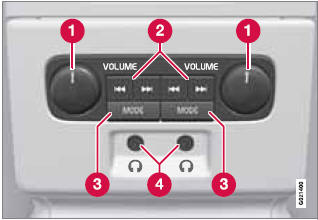
1 Volume control (right/left sides).
2 Scroll/search forward and back.
3 MODE – select: AM, FM1, FM2,HD Radio3, Sirius1*, Sirius2*, Disc, USB, iPod, Bluetooth, AUX and ON/OFF.
4 Headphones sockets (3.5 mm)
See also:
Driver distraction
A driver has a responsibility to do everything
possible to ensure his or her own safety and
the safety of passengers in the vehicle and others
sharing the roadway. Avoiding distractions
is part of ...
Source menu
The content of each source's pop-up menu will
vary, depending on what is being played/
viewed, for example: Disc menu or USB
menu. See also page 251 for additional information
about the RSE me ...
Dimensions
...