
Steering wheel keypad

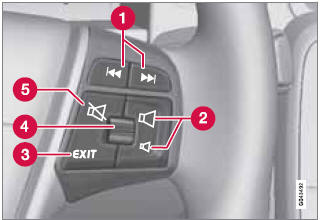
Standard steering wheel keypad
1 Left/right arrow keys: A short press moves between preset radio stations or tracks on a disc. Press and hold to search within tracks or to tune to the next/previous strong radio station.
2 Volume.
3 EXIT: Go higher in the menu system, interrupt the current function, reject an incoming phone call or erase any characters entered in the display. Press and hold to go to the highest level in the current menu.
From the highest level in the current menu, press and hold to go to the infotainment system's main menu view (see page 208).
4 Thumb wheel, used to scroll in the menus shown on the display. Press the thumb wheel to e.g., confirm a menu selection or to answer an incoming call on a Bluetoothconnected cell phone.
5 Mute
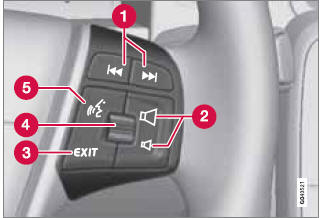
Steering wheel keypad with voice control button
1 Left/right arrow keys: A short press moves between preset radio stations or tracks on a disc. Press and hold to search within tracks or to tune to the next/previous strong radio station.
2 Volume.
3 EXIT: Go higher in the menu system, interrupt the current function, reject an incoming phone call or erase any characters entered in the display. A long press takes you to the main menu view (see page 208).
4 Thumb wheel, used to scroll in the menus shown on the display. Press the thumb wheel to e.g., confirm a menu selection or to answer an incoming call on a Bluetoothconnected cell phone.
5 Voice control (for operating Bluetooth®- connected cell phones and the optional navigation system)
See also:
Style
There are three C70 T5 trim levels: base, Premier Plus and Platinum. Our test
car was a Platinum with the Inscription option package. The Platinum trim
includes a number of exterior and interior a ...
Uniform Tire Quality Grading
ALL PASSENGER VEHICLE TIRES MUST CONFORM TO FEDERAL SAFETY REQUIREMENTS IN
ADDITION TO THESE GRADES
Quality grades can be found, where applicable, on the tire sidewall between
the tread shoulder ...
Location of taillight bulbs
Taillight lens, right side
1 Parking/side marker lights (LED)
2 Side reflector
3 Brake light
4 Backup light
5 Turn signal
6 Brake lights (LED)
NOTE
If an error message remains in the display ...