
Switching BLIS on and off

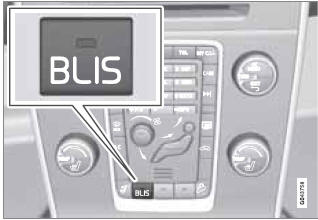
BLIS is automatically activated when the ignition is switched on. The indicator lights will provide confirmation by flashing 3 times.
• The system can be switched off by pressing the BLIS button in the center console (see the illustration). The indicator light in the button goes out when the system is switched off, and a text message is displayed.
• BLIS can be switched on again by pressing the button. The indicator light in the button will illuminate and a new text message will be displayed. Press the READ button (see page 131) to erase the message.
Depending on the vehicle's optional equipment,
there may not be space for the BLIS button
in the center console. In this case, BLIS can
be switched on and off in the menu system by
pressing MY CAR and going to Settings
 Car settings
BLIS. See page 134 for a
description of the menu system.
Car settings
BLIS. See page 134 for a
description of the menu system.
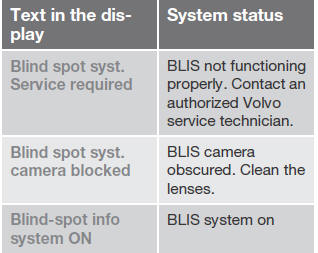
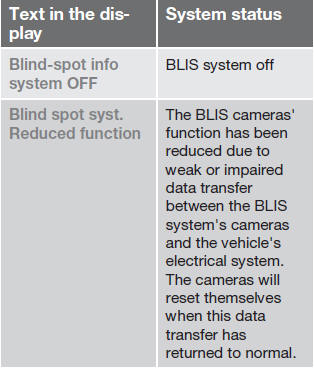
BLIS system messages
See also:
Watching a video
Video tracks/files can be viewed via the vehicle's
media player or the USB socket.
For more information about the media player,
see page 225 or page 227 for information about
the USB socket.
1 ...
Call lists
Call lists are copied to the hands-free function
each time a cell phone is connected and the
lists are updated while the phone is connected.
In normal view, turn TUNE counter-clockwise
to see t ...
Overview
The all-new Volvo S60 makes its international debut at the Geneva Motor Show
on Tuesday 2 March 2010. It launches into one of the automotive world's most
competitive segments backed by an elegant ...