
Vehicles equipped with Park Assist

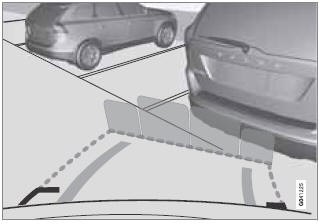
Colored fields (4-one per sensor) indicate distance
If the vehicle is equipped with the optional Park Assist system, the distance to an object will be indicated more exactly and colored markers in the display indicate which of the sensor(s) has detected the object.
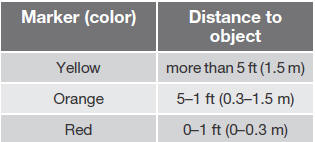
The markers change color (from yellow to orange to red) as the vehicle comes closer to the object.
See also:
Interior Air Quality System (IAQS)
A multifilter helps reduce gases and particles
in the incoming air, thereby reducing the levels
of odors and contaminants entering the vehicle.
The air quality sensor detects increased
levels o ...
Wiper blades
The windshield wiper blades are different lengths. The blade on the driver’s
side is longer than the one on the passenger side. ...
Operation
Settings are made by pressing MY CAR on the center console control panel and
using the menus displayed. ...