
Function

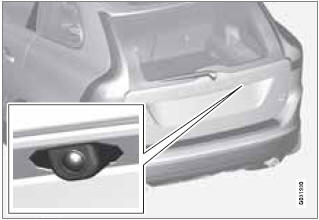
The driver sees what is behind the vehicle and if a person or animal should suddenly appear from the side.
PAC is mounted on the tailgate, near the opening handle.
The camera has built-in electronics that help reduce the “fish-eye” effect so that the image shown on the screen is as natural as possible.
This may cause some objects on the screen to “lean,” which is normal.
WARNING
Objects seen on the screen may be closer
than they appear to be.
See also:
Function
Location of the laser sensor in the windshield
City Safety™ monitors traffic ahead of you
using a laser sensor mounted in the upper section
of the windshield. If a collision is imminent,
City ...
Playing a disc
Press MEDIA several times until Disc is displayed.
Release the button and wait several
seconds or press OK/MENU. If there is a disc
in the player, it will begin playing automatically.
Otherwise, ...
Supplemental Restraint System
Supplemental Restraint System (SRS)
SRS warning light
As an enhancement to the three-point seat
belts, your Volvo is equipped with a Supplemental
Restraint System (SRS). Volvo's SRS
consists of ...