
Symbols and messages in the display

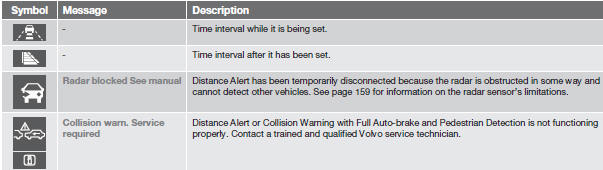
See also:
Mirrors with the water repellent glasscoating
• Do not apply wax, degreasing agents, etc
to this glass. This could damage the coating.
• Clean the glass surface with care to avoid
scratching.
NOTE
The water repellent coating is subject to
n ...
Main DVD Video menu
Disc menu
DVD disc menu
Play/Pause/Continue
Stop
Subtitles
Audio tracks
Advanced settings
Angle
DivX® VOD code
Audio settings ...
Standby mode due to action by the driver
ACC is temporarily deactivated and put in standby mode:
when the brakes are applied
if the driver's seat belt is taken off
If the driver's door is opened
if the gear selector is move ...