
Power door mirrors
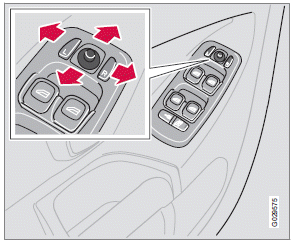
The mirror control switches are located on the driver's door armrest.
Driver's side: Press the L button (a light in the switch will light up) to activate the adjustment control and then use this control to adjust the driver's door mirror.
Passenger's door: Press the R button (a light in the switch will light up) and then use the adjustment control to adjust the passenger's door mirror.
After you have adjusted the mirror(s), press the L or R switch again (the light will go out) to deactivate the adjustment control.
For information about the optional folding mirror function.
WARNING
The mirrors should always be adjusted prior
to driving. Objects seen in the passenger's
side wide-angle door mirror are closer than
they appear to be.
Mirror memory function (with the central
locking system)
If you lock the vehicle and later unlock it with the same remote key and open the driver's door, the door mirrors (and the driver's seat) will automatically move to the position they were in when you left the vehicle. This feature will work in the same way with all of the remote key transmitters (up to 3) that you use with your vehicle. This feature will not function if you lock your vehicle with the key.
Water repellent glass
 The side door mirrors can be
treated
with a water repellent coating. The
symbol to the left indicates these windows
have this coating.
The side door mirrors can be
treated
with a water repellent coating. The
symbol to the left indicates these windows
have this coating.
The coating improves vision by causing the water to run off quickly.
For information on cleaning this type of glass.
CAUTION
Use the heating function to remove ice,
snow, or mist from the mirrors.
See also:
Geartronic–manual shifting
Geartronic allows you to manually shift among
your vehicle's six forward speeds. Geartronic
can be selected at any time.
• To access the manual shifting position
from Drive (D), move the gear s ...
Automatic answer
This function means that incoming calls will be answered automatically. Activate
or deactivate the function in the menu system under Phone menu Call options Auto
answer. ...
Marker lines
1 - Marker line for a 1-foot (30-centimeter) zone behind the vehicle 2 - Marker
line for the clear back-up zone 3 - "Wheel tracks"
The solid line (1) indicates a zone within 1 ft (30 ...