
The Inside
Like the exterior, the C30's cabin is highlighted by a design element, specifically a flowing center control panel. It's similar to the one in the S40 and V50, and the thin panel is partially separated from the rest of the dash, leaving room for a small storage bin behind it. It's a polarizing design, for sure — I found it modern and appealing while my wife thought it was ugly.
Whatever your opinion of the center console's design, its controls for things like the audio system and air conditioning are nicely integrated. The systems all share one LCD display, which each system monopolizes when necessary, like when you're tuning the radio or adjusting the air conditioning system's fan speed. It's an ergonomic setup overall, but I couldn't get used to the fact that the temperature setting doesn't display the exact temperature in its readout. Instead of setting the cabin at 72 degrees Fahrenheit, for instance, you have to guess where 72 falls between Low and High.
The C30 has front and rear bucket seats trimmed in Volvo's synthetic T-Tec material. Leather seats are optional. The T-Tec front buckets provide decent comfort, but they're on the narrow end of the spectrum and some occupants might find that the seat catches them in the wrong places. The standard manual seats (power seats are optional) are highly adjustable and include seat height, seat cushion angle and lumbar support controls. A tilt/telescoping steering wheel is standard.
The rear bucket seats are tolerable for adults as long as the front seats aren't slid too far rearward. Seat cushioning is rather firm, and the upright backrest might prove uncomfortable on longer trips.
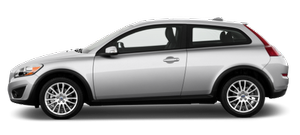
From the driver's perspective, the primary downfall of the C30's cabin is that rear visibility is restricted due to wide D-pillars on either side of the glass hatch, as well as big rear-seat head restraints.
See also:
Opening and closing the hood
1 Pull the lever located under the left side of
the dash to release the hood lock. An information
symbol will illuminate when the
hood is open.
2 Lift the hood slightly. Press the release
c ...
Engine compartment
1 Brake fluid reservoir
2 Relay/fuse box
3 Air cleaner
4 Radiator
5 Dipstick-engine oil
6 Filler cap-engine oil
7 Washer fluid reservoir
8 Power steering fluid reservoir
9 Expansion tank-coo ...
ABS with EBD (Electronic Brake ForceDistribution)
EBD is an integrated part of the ABS system.
EBD regulates the hydraulic pressure to the
rear brakes to help provide optimal braking
capacity. The brake pedal will pulsate during
braking, which ...