
Selecting a magnetic zone
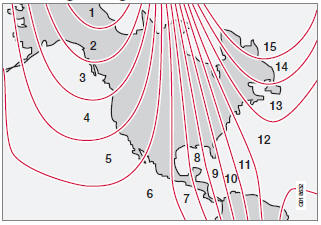
Magnetic zones.
The earth is divided into 15 magnetic zones. The correct zone must be selected for the compass to work correctly.
1. Put the ignition in mode II.
2. Using a pen or similar object, press and hold the button on the rear side of mirror for at least 3 seconds. The number for the current area will be shown.
3. Press the button repeatedly until the number for the required geographic area (1 – 15) is shown.
4. The display will revert to showing the compass direction after several seconds.
See also:
Navigating a disc and playing tracks
CD audio discs
Turn TUNE to access the disc's playlist and to
navigate in this list. Press OK/MENU to confirm
a choice and begin listening. Press EXIT
to cancel. Press and hold EXIT to return t ...
Spare wheel
The spare wheel is only intended for temporary
use. Replace it with a normal wheel as soon as
possible. The car's handling may be altered by
the use of the spare wheel. The correct tire
pressu ...
Ambient lighting conditions
The camera automatically monitors the ambient
lighting conditions behind the vehicle and
constantly adjusts sensitivity to light. This may
cause the brightness and quality of the image
on the ...