
Brake lights and taillights
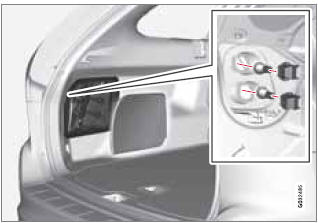
The brake lights and taillights are replaced from inside the cargo area.
NOTE
Before starting to replace a bulb, see
page 322.
1. Open the panel.
2. Remove the bulb holder by turning it counterclockwise.
3. Remove the burned out bulb by pressing it in and turning it counterclockwise.
4. Insert a new bulb, press it in and turn it clockwise.
5. Reinsert the bulb holder and turn it clockwise.
See also:
Volvo programs
Volvo On Call Roadside Assistance
Your new Volvo comes with a four year ON
CALL roadside assistance. Additional information,
features, and benefits are described in a
separate information packa ...
Mounting the cargo net
The cargo net is easiest to put in place through
one of the rear doors.
1. Fold out the cargo net and be sure that the
upper hinged rod is straight and locked in
position.
2. Insert one end of ...
Periodic maintenance helps minimize emissions
Periodic maintenance will help keep your vehicle
running well. Your Warranty and Service
Records Information booklet provides a comprehensive
periodic maintenance schedule up
to 150,000 miles ...